
Declare Your Major in General Studies
Declaring a major in a General Studies Associate Degree or Certificate of Completion in General Education will not remove the major(s) in which you are currently declared.
We want to make changing your major as easy as possible, we have the Change My Major app to use. Follow the steps below.
Note: If you want a certificate of completion in general education, you will choose “General Education” rather than “General Studies" for the Major.Steps to Declare Your Major
STEP 1: Go to your eWeber portal and open the Change My Major App
STEP 2: Use the Major dropdown to select your major (General Studies or General Education).
STEP 3: The app will prompt you to select a degree type. Choose Between an Associate of Arts (AA) or an Associate of Science (AS).
Choosing the Associate of Arts requires World Language credit.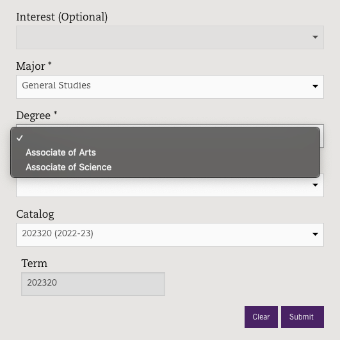
STEP 4: The app will prompt you or you will be emailed regarding any requirements and extra steps you’ll need to take for certain majors.
STEP 5: Click Submit to complete your major declaration request. It is an automatic process.
STEP 6: Your major will appear in CatTracks.
Refresh your cattracks if it does not how up at first
If you have any questions, schedule an appointment or contact our office at studentpathways@weber.edu or 801-626-6752Additional Information
Connect With Us
General Studies & Exploratory Advising
Student Services Center Room 140
studentpathways@weber.edu
801-626-6752