







Parking
Permits are required in all lots on campus Monday–Friday, 7 a.m. to 4 p.m.
SUMMER SEMESTER 2024
Permits for summer semester are on sale now! The W4, W5, and W12 lots do not require a permit to park beginning Monday, April 29th through Friday, August 23, 2024.
Weber State Parking permits are virtual.
A physical hangtag permit is no longer required. The system will allow faculty, staff and students to purchase permits from a computer or smart phone and their license plate will grant the parking permissions/privileges. Use a browser other than Safari as it is not compatible with the payment gateway.
Tips to Avoid a Parking Ticket
- Be sure to verify that the license plate(s) registered on your permit is/are accurately entered (careful to enter a zero and not an O if applicable).
- Park so that the license plate is visible from the travel lane. If you don't have a front plate, don't pull through a parking space.
- Check the box next to the vehicle you want active on your permit. Only one license plate may be active on permit at a time.
- Faculty/staff may have two plates active under permit but only one vehicle may be parked on campus at a given time.
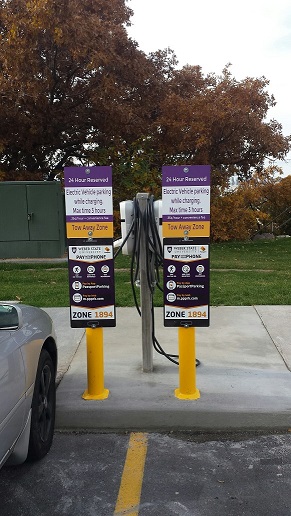 Electric vehicles with a valid WSU parking permit may charge for free.
EV stations are available in lots A1, A2, A5, A6, A7, A13, A14, W4, W6, W7, W12 (Davis), Dee Events Center and the Community Education Center. Electric vehicles with valid parking permit may park while charging for a max of 3 hours.
Green Vehicle Permit Rebate
WSU Parking Services is proud to offer a 20% rebate on annual parking permits issued to fuel efficient, low emission vehicles. The green vehicles rebate is available for vehicle models made in the year 2000 and newer that meet a Green Book Score of 46 or higher. The Green Book Score is a rating based on vehicle mpg and emission standards as set by the American Council for an Energy-Efficient Economy.
Step 1: Purchase and pay for a parking permit as normal, online through your eWeber Portal.
Step 2: Visit Parking Services in the Public Safety Building and have on-hand the vehicle make, model, and registration to verify that your vehicle meets the Green Book Score rating of 46+. Alternatively, call ahead at 801-626-6533 with the same information as mentioned above (vehicle make, model, and registration) to see if your vehicle qualifies.
Step 3: Once your vehicle has been approved and meets the Green Book Score standard, you will receive your 20% parking permit reimbursement check in the mail.